
Gauge Controller Input Sources
There are several ways to provide input to the controller. The best choice depends on whether you are using a flight controller, telemetry sensors, SBUS, or direct RC channels.
Quick Comparison
| Input Type | Typical Source | Recommended Use |
|---|---|---|
| MSP | iNav, Betaflight | Recommended for most FPVToys installations. |
| MAVLink | ArduPilot | Best option for ArduPilot-based aircraft. |
| SmartPort | FrSky telemetry receiver | Useful when telemetry is available from the receiver. |
| SBUS | Receiver | Simple RC-based control without flight controller telemetry. |
| R/C | Direct receiver channels | Standalone operation using radio channels. |
Not sure which option to use? MSP is recommended for most iNav and Betaflight installations, while MAVLink is recommended for ArduPilot systems.
Flight Controller
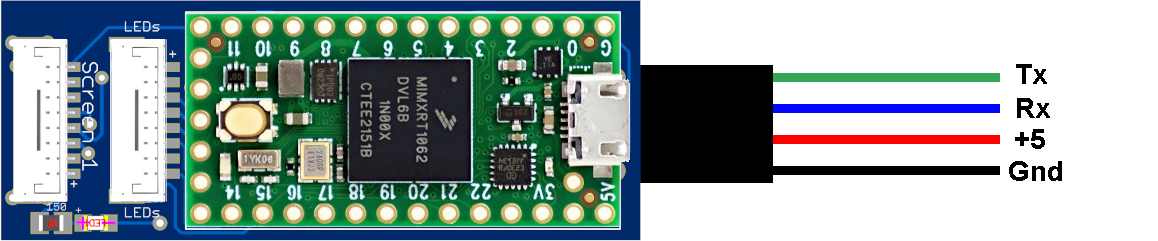
MSP Protocol
The best option, and the one that provides the most functionality, is the MSP protocol.
- iNav provides the most functionality.
- ArduPilot provides almost as much functionality, but a few advanced messages are not provided.
- BetaFlight will also work, but it is missing some airplane-specific messages.
Use the following wiring diagram to hook up to a flight controller. Use the CLI command input m to set MSP protocol. MSP is the default input option.
MAVLink
MAVLink on ArduPilot provides almost as much functionality as MSP. MAVLink on iNav is much more limited.
Use the CLI command input v to set MAVLink protocol.
SmartPort (S.Port) Protocol
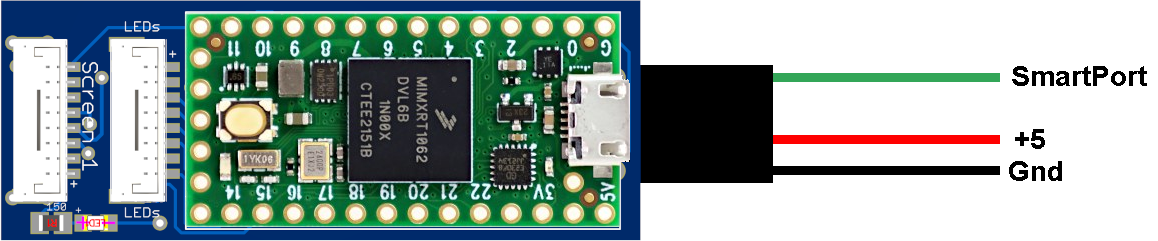
If you do not have a flight controller but do have SmartPort sensors, the controller can use whatever data is available.
- You must have a receiver that is able to read the sensors.
- You will need to tap into the S.Port line and feed it into the controller.
- The S.Port update is much slower than MSP, but it can provide much of the same functionality as MSP when the correct sensors are installed.
Use the CLI command input p to set S.Port. Use input i for inverted S.Port.
SBUS Protocol
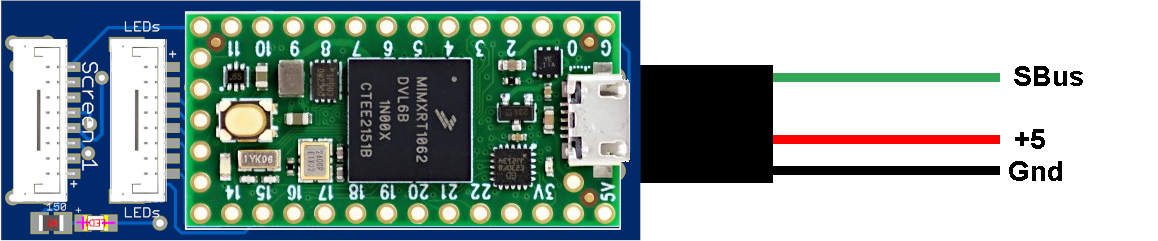
The controller can also use the SBUS protocol. It will use the 4 primary channels and feed them into the internal simulator. The simulator will do its best to estimate what should be displayed on the screens.
Use the CLI command input s to set SBUS protocol.
RC Channels
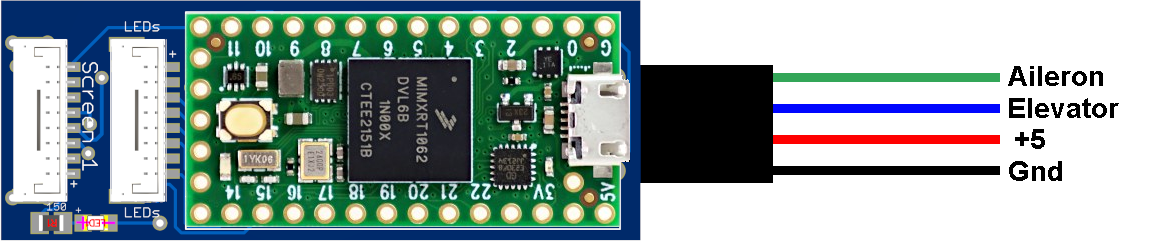
The controller can also take input from 2 RC channels: aileron and elevator. It will use the simulator, simulate the throttle at half, and keep the rudder centered.
Use the CLI command input r to set RC channel input. If you use RC channels, make sure they are 3.3V and not 5V.
Troubleshooting Guide.