
Radio Setup
Instructions on how to set up your radio in EdgeTX so you can control the gauges while in flight.
You can select two channels to control the screens. One analog channel can be used to control the course selection for the HSI / map. A second channel can be used to control everything else.
This example uses channel 8 for all of the following functions:
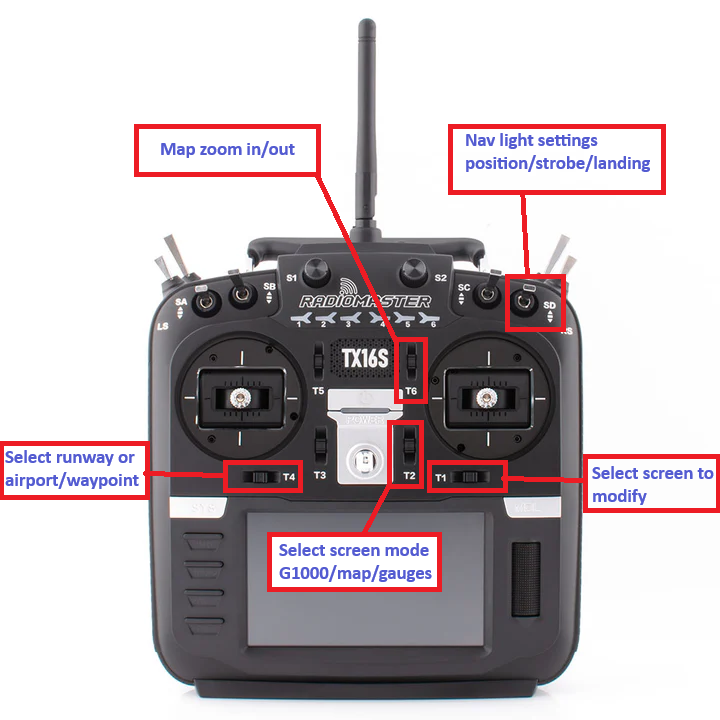
I have switch SD set the channel to 1000 / 1500 / 2000. This sets the navigation lights to position only / strobes / landing lights.
- 1400 / 1600 – Zoom in / out of the map
- 1300 / 1700 – Cycle through what is displayed on the selected screen: G1000 / map / gauges
- 1200 / 1800 – Cycle through the screens if more than one is installed
- 1100 – Select runway for ILS approach
- 1900 – Select airport / waypoint for navigating to
Below is a section of my YML file from EdgeTX to set up channel 8 to perform the functions above. Channels are zero based, so destCh: 7 is channel 8.
-
  weight: 100
  destCh: 7
  srcRaw: SD
  carryTrim: 0
  mixWarn: 0
  mltpx: ADD
  speedPrec: 0
  offset: 0
  swtch: "NONE"
  flightModes: 000000000
  delayUp: 0
  delayDown: 0
  speedUp: 0
  speedDown: 0
  name: "Lights"
-
  weight: 20
  destCh: 7
  srcRaw: MAX
  carryTrim: 0
  mixWarn: 0
  mltpx: REPL
  speedPrec: 0
  offset: 0
  swtch: "TrimT6Up"
  flightModes: 000000000
  delayUp: 0
  delayDown: 0
  speedUp: 0
  speedDown: 0
  name: ""
-
  weight: -20
  destCh: 7
  srcRaw: MAX
  carryTrim: 0
  mixWarn: 0
  mltpx: REPL
  speedPrec: 0
  offset: 0
  swtch: "TrimT6Down"
  flightModes: 000000000
  delayUp: 0
  delayDown: 0
  speedUp: 0
  speedDown: 0
  name: ""
-
  weight: 40
  destCh: 7
  srcRaw: MAX
  carryTrim: 0
  mixWarn: 0
  mltpx: REPL
  speedPrec: 0
  offset: 0
  swtch: "TrimEleUp"
  flightModes: 000000000
  delayUp: 0
  delayDown: 0
  speedUp: 0
  speedDown: 0
  name: ""
-
  weight: -40
  destCh: 7
  srcRaw: MAX
  carryTrim: 0
  mixWarn: 0
  mltpx: REPL
  speedPrec: 0
  offset: 0
  swtch: "TrimEleDown"
  flightModes: 000000000
  delayUp: 0
  delayDown: 0
  speedUp: 0
  speedDown: 0
  name: ""
-
  weight: -60
  destCh: 7
  srcRaw: MAX
  carryTrim: 0
  mixWarn: 0
  mltpx: REPL
  speedPrec: 0
  offset: 0
  swtch: "TrimAilLeft"
  flightModes: 000000000
  delayUp: 0
  delayDown: 0
  speedUp: 0
  speedDown: 0
  name: ""
-
  weight: 60
  destCh: 7
  srcRaw: MAX
  carryTrim: 0
  mixWarn: 0
  mltpx: REPL
  speedPrec: 0
  offset: 0
  swtch: "TrimAilRight"
  flightModes: 000000000
  delayUp: 0
  delayDown: 0
  speedUp: 0
  speedDown: 0
  name: ""
-
  weight: -80
  destCh: 7
  srcRaw: MAX
  carryTrim: 0
  mixWarn: 0
  mltpx: REPL
  speedPrec: 0
  offset: 0
  swtch: "TrimRudLeft"
  flightModes: 000000000
  delayUp: 0
  delayDown: 0
  speedUp: 0
  speedDown: 0
  name: ""
-
  weight: 80
  destCh: 7
  srcRaw: MAX
  carryTrim: 0
  mixWarn: 0
  mltpx: REPL
  speedPrec: 0
  offset: 0
  swtch: "TrimRudRight"
  flightModes: 000000000
  delayUp: 0
  delayDown: 0
  speedUp: 0
  speedDown: 0
  name: ""
-